Separate active shows from future picks and shows you've stopped. Keep your real episode history, then tidy your streaming app's Continue Watching row separately.
Track the last anime episode you finished by its title and season or part. When a streamer and a tracker use different numbers, check the official episode list before you mark anything watched.
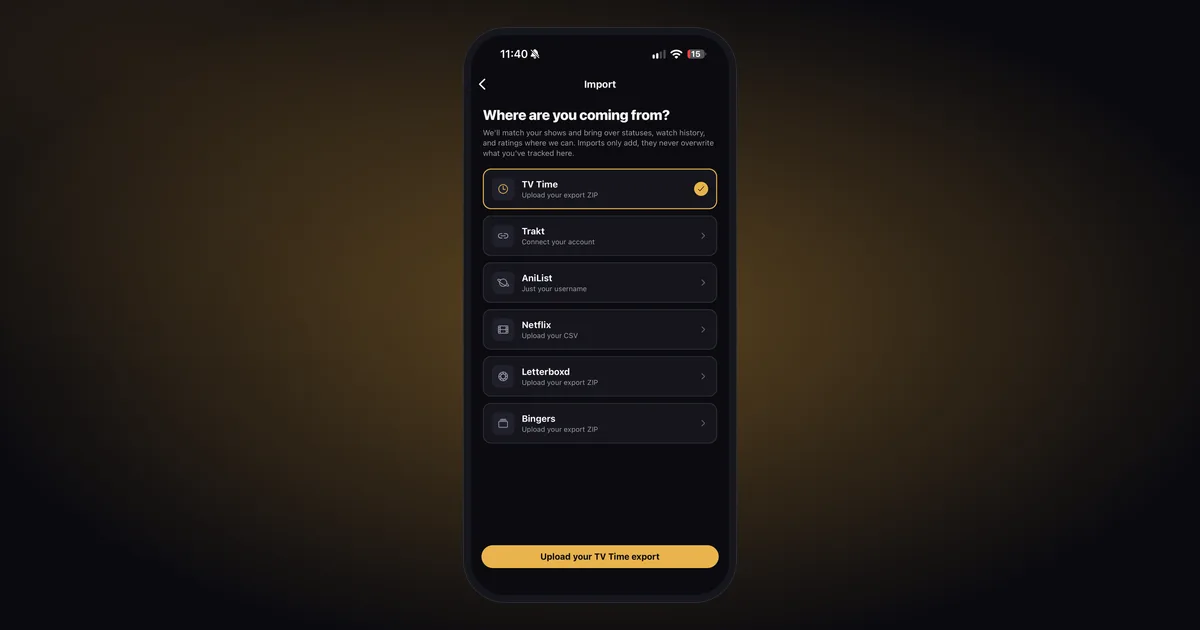
Export your Bingers data as a ZIP, then upload it through LazyWatch's Bingers import. Bring shows, movies, episode dates, ratings, rewatches and lists with you.
Enter your AniList username in LazyWatch's AniList import to bring across anime progress, statuses and scores. Check familiar titles before relying on the imported list.
To import your TV Time history into LazyWatch, upload the data export ZIP you saved before TV Time shut down. Your episode history comes across with its original dates, and nothing you've already tracked gets overwritten.
To watch a show at the same pace as friends, agree on an episode checkpoint and discussion time, then keep everyone's watched progress visible. You can watch on different nights and still have the same episode to talk about.
To track upcoming TV episodes, keep a schedule of the shows you follow, check release times in your own time zone, and enable reminders for the ones you want to watch as they arrive.
Keep your original watch history and record each TV rewatch as a separate pass with its own episode progress. A rewatch tracker or viewing log helps you keep both records.
To import Letterboxd history into LazyWatch, download your account export from Letterboxd Settings, then upload it through LazyWatch's Letterboxd import. Watches, ratings and your watchlist come across, with an option to bring reviews as comments.
To organize a movie watchlist, keep one main collection of films you want to see and a small shortlist for your next viewing. Separate watched films, record why you saved each pick, and remove titles you no longer want.
To keep track of TV shows, keep one record of your last watched episode and update it after you finish watching. Separate shows you want to start from those you're watching or have stopped.
To import Trakt history into LazyWatch, link your Trakt account with a short code. The import brings over watched shows and movies, your watchlist, and ratings without overwriting existing progress.
Download your profile’s viewing history as a CSV from Netflix, then upload it through LazyWatch’s Netflix import. Shows and movies are matched with their original watch dates, and imports add to your existing progress.