How to import your TV Time history into LazyWatch
To import your TV Time history into LazyWatch, upload the data export ZIP you saved before TV Time shut down. Your episode history comes across with its original dates, and nothing you've already tracked gets overwritten.
By Mohammad Alzeer4 min read
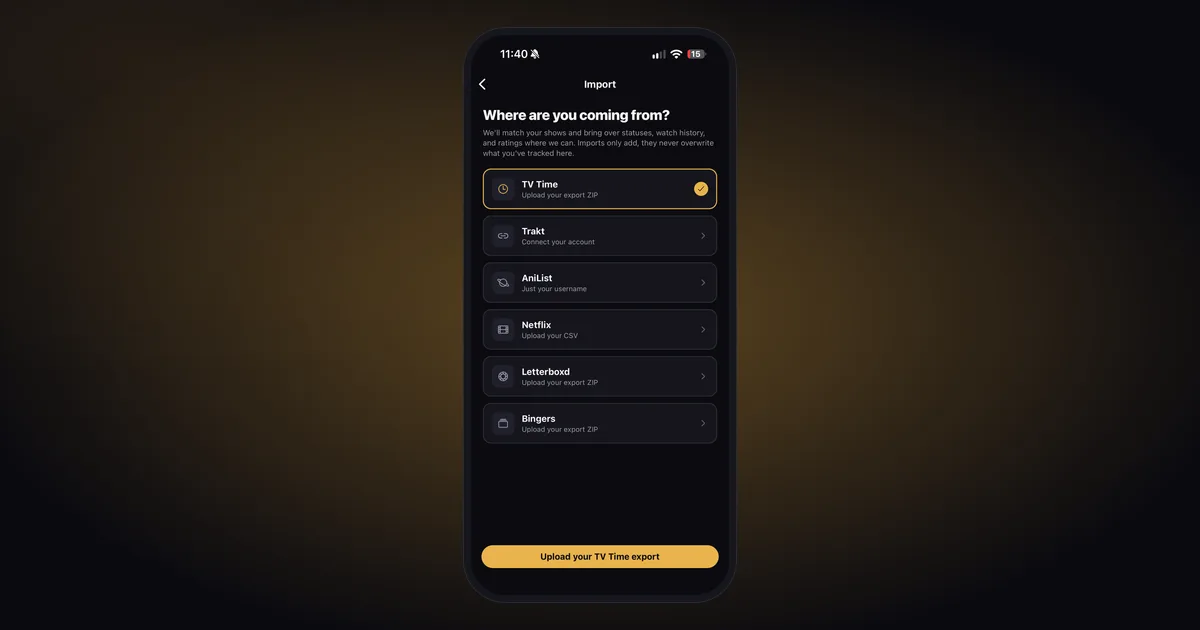
To import your TV Time history into LazyWatch, upload the TV Time data export (the ZIP file) on the app's Import screen. Your watched episodes come across with their original dates, along with your statuses, favorites, Watch Later and lists, and nothing you've already tracked gets touched.
The catch is the file. TV Time shut down after July 15, 2026, so this only works if you downloaded your export before then. If you didn't, skip down to rebuilding without one. There's still a way back, it's slower.
We build LazyWatch, and the four of us were TV Time people for years, so this one's personal. We checked TV Time's shutdown details and our own import on October 23, 2026.
Can you still export your TV Time data?
Probably not. When TV Time announced it was shutting down, it said exports would be available through its GDPR tool until July 15, 2026, and that personal data would be deleted after that. Since then, people report the old export page at gdpr.tvtime.com doesn't load at all. We haven't found any other way to request a new export.
So the real question is whether you already have the file. Search your downloads and your email for a ZIP from TV Time or Whip Media, the company that ran it. Plenty of people requested it in July, got the email, and forgot about it.
If you find it, make a copy before you do anything else. Cloud storage, a USB stick, an email to yourself, whatever you'll still have in five years. That file is the only copy of your history now.
How to import your TV Time history into LazyWatch
Once you've got the ZIP, the import itself takes a couple of minutes of your time. The app does the rest in the background.
- Get LazyWatch on iPhone, Android or the web, and sign in to the account you plan to keep.
- Open Import and pick TV Time.
- Upload the ZIP you saved.
- Carry on using the app while it works. You'll get a notification when it's done.
- If anything didn't match, open Fix matches and sort those titles out by hand.
Imports only add. If you've already started tracking in LazyWatch, your TV Time history slots in around it instead of replacing it. And if something looks off, undoing the import removes only what that import brought in, so you can run it again without losing anything you logged yourself.
You can see all six import sources on the features page.
What comes across from TV Time?
Pretty much everything you'd miss. Here's what the TV Time import brings over.
| From your TV Time export | Comes across? |
|---|---|
| Full episode history, with original watch dates | Yes |
| Rewatches, per episode | Yes |
| Show statuses and favorites | Yes |
| Watch Later and your lists | Yes, sorted into the right place |
| Your episode votes: ratings, reactions, favorite characters | Yes |
| Your episode comments and GIFs | Optional, you choose |
| Shows and movies | Both |
The dates are the part people worry about, and they stay as they were. That 2019 binge stays in 2019, so your stats still add up the way you remember them. Rewatches come across per episode too, and our guide to tracking rewatches explains how LazyWatch keeps a second watch separate from the first.
What to check after the import
Don't scroll through years of history. Spot-check a few titles that would show a problem fast:
- A show you're halfway through. Does it point you at the right next episode?
- A show with specials or strange season numbering, since those are where matching usually trips up.
- Something you'd stopped watching. It should be sitting in Stopped watching, not Continue watching.
- One show and one movie from your Watch Later.
If a title's wrong or missing, check Fix matches first. If it isn't there either, tell us what happened and include the show name.
No export? How to rebuild your TV Time history
Without the file, nothing can pull your history out of TV Time anymore. You'll be rebuilding it. That sounds worse than it is.
Build your history is made for exactly this. You swipe through shows and movies one at a time: right for watched, left to skip, down for Watch Later, up for stopped watching. It's a fast way to fill in years of watching in one sitting, and the rest tends to come back to you as you go.
Some of your history might also live somewhere else. If you ever connected Trakt, kept a Letterboxd diary or watched mostly on Netflix, those can fill a lot of gaps. We've got guides for importing from Trakt, Netflix and Letterboxd. AniList and Bingers imports work too.
If you're still deciding where to land, our TV Time alternatives comparison goes through the main options.
After the move
Getting your history back is the boring part. What we actually missed about TV Time was having somewhere to go the second an episode ended.
Every episode in LazyWatch has its own comment section, and comments stay hidden until you've watched far enough, so an accurate history means you can open a thread without getting spoiled. Pick the show you were in the middle of when TV Time went dark, check where you left off, and see what everyone thought of the next one.
Get LazyWatch and bring your history with you.
Common questions
Can I still request a TV Time data export?
Not as far as we can tell. TV Time said exports would be available until July 15, 2026, and people report the old export page no longer loads. If you saved the ZIP before then, it still works.
Will my TV Time watch dates come across?
Yes. Your full episode history comes across with its original dates, along with per-episode rewatches.
Will importing TV Time overwrite what I've already tracked in LazyWatch?
No. Imports only add. Anything you've already logged stays as it is, and undoing an import removes only what that import brought in.
I never saved my TV Time export. Can I still move to LazyWatch?
Yes, but you'll be rebuilding rather than importing. Build your history lets you swipe through shows and movies to mark them watched, and you can import anything you also tracked on Trakt, Netflix, Letterboxd, AniList or Bingers.
Sources
- TV Time import
- TV Time export
- TV Time shutdown
- watch history migration
- TV tracking
- episode tracking