TV Time alternatives: five apps to track shows and keep your history
Our ranked TV Time alternatives, led by LazyWatch for community, TV and movie tracking, and imports from TV Time, Letterboxd, and more.
By LazyWatch5 min read

LazyWatch is our number-one TV Time alternative for people who want a community around their shows, alongside TV and movie tracking. Our ranking is: 1. LazyWatch, 2. Trakt, 3. SIMKL, 4. Serializd, and 5. Showly. LazyWatch brings episode conversations, friends, shared watching, and movie-night decisions into the same place as your watch history.
We're the people building LazyWatch, so this is our editorial ranking, based on what we wanted from a TV Time replacement: community first, easy tracking, and a place for both shows and movies. We checked the official feature pages rather than claiming to have tested every app. If automatic logging is your priority, your order may look different.
Which TV Time alternative fits how you watch?
The right app depends on what you want to do after the credits roll.
| Rank | App | Start here if you want | What to check before switching |
|---|---|---|---|
| 1 | LazyWatch | Show and movie tracking with episode conversations | How your saved history matches after import |
| 2 | Trakt | Automatic logging through compatible integrations | Whether your playback setup supports scrobbling |
| 3 | SIMKL | TV, movies, and anime in one service | Which tracking tools and membership features you need |
| 4 | Serializd | A TV diary, reviews, and community lists | Whether its TV focus suits your watching habits |
| 5 | Showly | Show and movie progress with Trakt sync | Whether you want to connect a Trakt account |
We've put LazyWatch first because community is the heart of what we're building. Use the ranking to find your shortlist, then try the routine you repeat every night.
Our ranking of five TV Time alternatives
1. LazyWatch: our top pick for community, shows, and movies
We built LazyWatch because keeping a list was only part of what we wanted. An episode ends, something ridiculous happens, and you want somewhere to talk about it.
LazyWatch puts the community right next to what you're watching. Episodes have their own conversations, movies have comments too, and you can follow friends instead of keeping your watching habits to yourself. Rate what you watch, compare your stats, and share your favorites.
Watch Together keeps a group's progress and chat in one place. Swipes helps friends agree on their next movie or binge. For us, that's the reason to come back after marking an episode watched: there are people to share it with. Explore the community and tracking features.
It's free and has no ads, with iPhone, Android, and web access. For people switching trackers, it supports imports from TV Time, Trakt, Letterboxd, AniList, and Netflix. See our FAQ for more import and device information.
If the part you miss is reacting to an episode with other fans, LazyWatch is where we'd start. Get the app and bring your watching history with you.
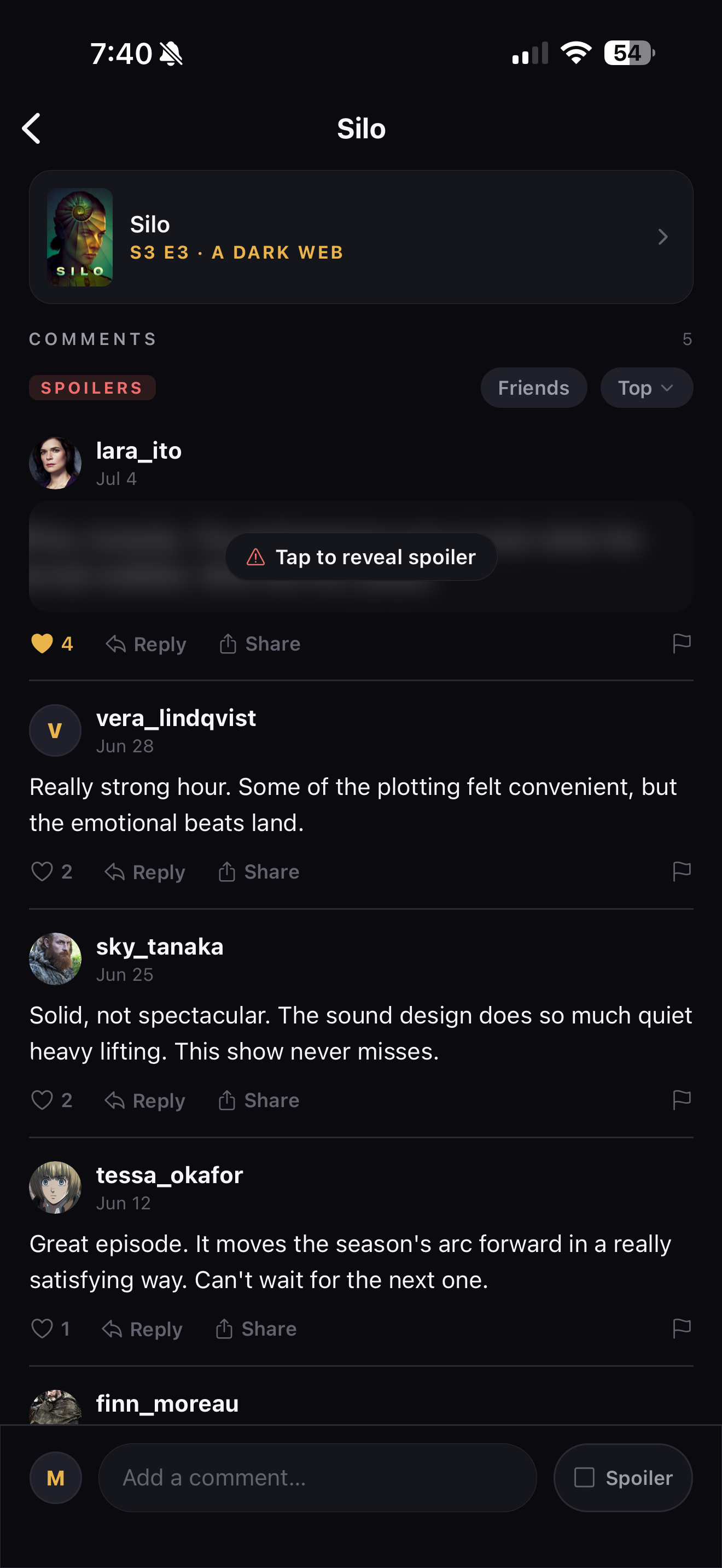
Episode conversations in LazyWatch, with spoiler controls and replies.
2. Trakt: for automatic tracking through integrations
Trakt's scrobbling system lets compatible media software report when you start, pause, or finish a movie or episode. That makes it worth considering if manually marking things watched is the part you keep forgetting.
Automatic tracking depends on the integration, rather than simply having a Trakt account. Check your actual playback setup before choosing it for that reason. Trakt explains the mechanism in its official scrobbling documentation.
3. SIMKL: for TV, movies, and anime together
SIMKL explicitly covers TV shows, movies, and anime. Its official site also describes automatic tracking tools, episode alerts, recommendations, and imports from other services.
If anime is a big part of your week, include it in your shortlist. Check a long-running series you know well, especially its seasons and episode order. A broad catalog matters less if your own progress is awkward to record.
SIMKL offers free access alongside PRO and VIP memberships. Check the official SIMKL site for the current tools and membership details.
4. Serializd: for a TV diary and reviews
Serializd combines show tracking with ratings, reviews, a TV diary, member lists, and discussions. Its official site lists web, iOS, and Android access, says its current features are free, and confirms imports from TV Time and Trakt.
It's a sensible place to start if writing about a season is as important to you as finishing it. Its stated focus is television, so assess that against your movie-tracking needs.
See Serializd's features and FAQs before moving your history.
5. Showly: for progress tracking with Trakt sync
Showly tracks shows and movies, manages watchlists, shows upcoming episodes, and supports syncing history, collections, and watchlists with Trakt. Its official site currently lists both iOS and Android availability.
That last detail is worth checking: some alternative lists still describe it as Android-only. We wouldn't rule it out on that basis.
See the official Showly feature page and try its progress view with a few shows you follow.
How to choose without moving your history twice
Before importing years of watching, give your shortlist a small test:
- Add one ongoing show, one completed series, and one movie if you track films.
- Mark an episode watched, then undo it.
- Find the next episode you haven't seen.
- Look for an upcoming release you care about.
- Open a discussion and check whether the spoiler controls suit you.
- Check how to import and export your history.
An app can have every feature on your list and still feel awkward every night. That daily routine is the useful test.
Keep your watch history safe when switching
If you already have a TV Time export, keep an untouched copy before uploading it anywhere. Check the new app's current import instructions instead of assuming every importer preserves the same fields.
After importing, compare a handful of familiar titles. Check watched episodes, dates where supported, favorites, and watchlist statuses. Include a show with specials or unusual season numbering.
For LazyWatch, our FAQ describes TV Time ZIP imports and the history fields they support. If you don't have an export, Build your history lets you rebuild your list by swiping through titles.
We can't promise another service will still provide an export when you need one. A tracker accepting a saved file doesn't mean the original service can still generate it.
Our advice: choose around the part you missed
If you mainly want automatic logs, start by checking Trakt's compatible integrations. If you want a TV diary, look at Serializd. If you track anime alongside films and series, compare SIMKL. If you want progress tracking tied to Trakt, try Showly.
And if you want a place to track your shows and talk about them afterward, that's what we're building. Get LazyWatch, bring a few favorites over, and see whether it feels like somewhere you'd come back to.
Common questions
Which TV Time alternatives support importing my history?
LazyWatch and Serializd both document support for TV Time imports. Check each app's current instructions and compare a few familiar titles after importing. Keep an untouched copy of your export.
Can I use LazyWatch without a TV Time export?
Yes. You can add titles and record progress manually, or use Build your history to swipe through shows and movies.
Is LazyWatch available on iPhone and Android?
Yes. LazyWatch is available on iPhone, Android, and the web. The Get the app page links to each option.
Sources
- TV Time alternatives
- TV tracker apps
- TV and movie tracker
- watch history
- episode tracking