How to keep track of shows across streaming services
Keep one master TV list outside your streaming apps. Record your progress there, then check each show's availability in your country before watching.
By Mohammad Alzeer4 min read

To keep track of shows across streaming services, keep one master list outside the streaming apps. Record your progress there, then check each show's current availability in your country before deciding where to watch.
The service you use tonight can change. Your record of the show shouldn't have to. This guide focuses on that split: what you're watching, where it's available, and what to keep when you take a break from a subscription.
What belongs in a cross-service TV list?
Keep the show's title, your last finished episode, whether you plan to continue, and where you last checked its availability. Treat the streaming service as a detail you can update rather than the place your whole list lives.
A note or spreadsheet works. Use a tracker when you'd rather have episode records and regional streaming information beside each other.
Here's a fictional example. The service names are placeholders, not availability claims.
| Show | Last finished | Watching plan | Availability note |
|---|---|---|---|
| Example mystery | S2E4 | Continue this week | Service A, checked today |
| Example comedy | S1E6 | Wait until next month | Recheck before returning |
| Example anime | S1E12 | Wait for more episodes | No next-season date recorded |
Don't recreate your entire viewing life before using the list. Start with the shows split between the apps you open now.
For the episode-number habit itself, our guide to keeping track of TV shows covers how to record where you stopped.
How do you find which service has your show?
Check availability for your country, then distinguish a subscription offer from a rental or purchase. Before paying for a service, open its own title page and confirm that it carries the season you need. A show's name appearing in a search isn't enough to plan around.
JustWatch's streaming guide separates subscription, free, ad-supported, rental and purchase offers. Its provider documentation also treats country and offer type as separate availability fields.
That distinction matters when a result looks promising but requires another payment. Check the exact season, too. Finding season 1 doesn't answer whether you can continue season 3.
In LazyWatch, set your region and the services you have. Title pages show regional where-to-watch information, and your selected services light up. Keep your viewing progress in Continue watching, then check the title's streaming options when you're ready to resume.
Where-to-watch information in LazyWatch is powered by JustWatch. Confirm the offer on the streaming service before subscribing, especially if you're returning after a long gap.
Can one app automatically combine every streaming history?
Don't assume an app can read every service's viewing activity. Check which connections it actually supports and whether it needs a file import or manual updates. A single list can cover all your shows without automatically knowing everything you watched.
There are useful connected experiences. Apple's iPhone guide explains that the Apple TV app can show the next episode from connected, supported streaming apps. Apple also notes that availability varies by country or region. That's a defined set of connections, not a promise to combine every service.
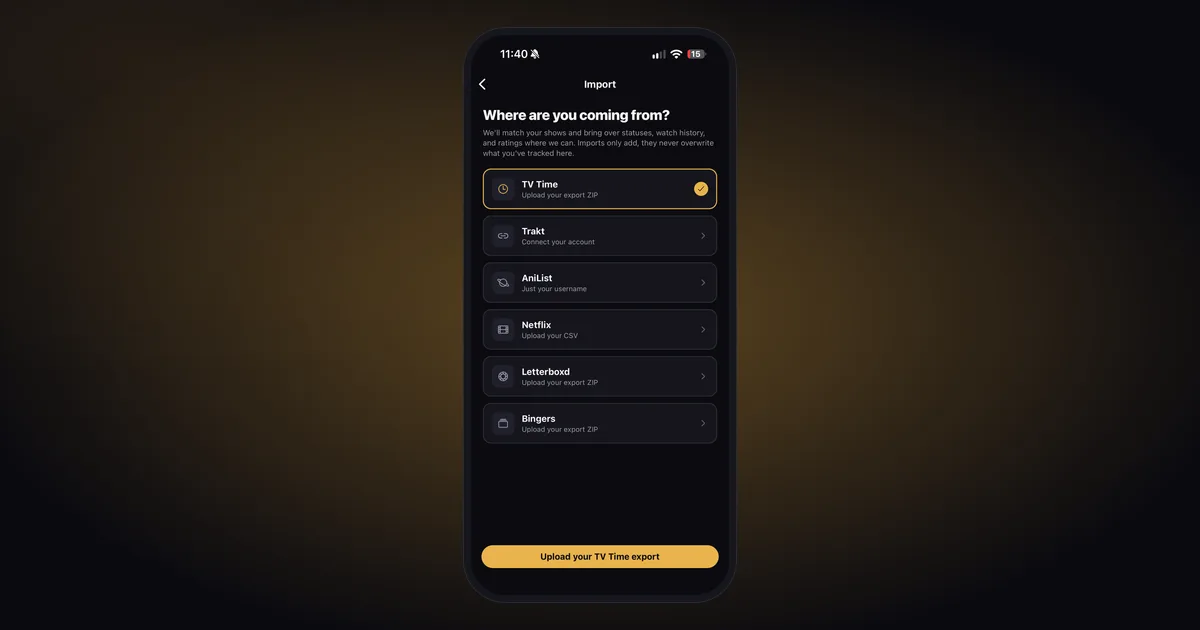
LazyWatch supports a Netflix viewing-history CSV import. That brings across shows and movies with their original dates; it isn't a claim that Netflix continuously sends your new watches to LazyWatch.
For shows you watch elsewhere, add them to your master list and mark episodes after finishing them. You don't need a separate master list for each service.
How do you bring scattered viewing history together?
Use a supported export or connection where you have one, then check familiar titles before relying on the result. Fill gaps manually. If a household shares a profile, compare its activity with what you remember watching rather than treating every entry as yours.
Netflix's viewing-history instructions explain how to open Account in a browser, select Profiles, choose a profile and open Viewing activity. Download all saves the list as a CSV.
Our Netflix import guide covers bringing that file into LazyWatch. If you've already kept a combined record in Trakt, use the separate Trakt import guide.
LazyWatch imports only add to what you've already tracked. They don't overwrite your existing progress. That helps when you're bringing a service-specific record into a library you've already started.
Keep your original export as well. It's useful to have the source file when you're checking an unfamiliar match or a date you don't remember.
What should you save before taking a subscription break?
Record your current episode and any shows you still want to try before you leave. Keep those entries in your master list even if you can't watch them this month. Review the service's own account rules separately; don't assume cancellation and account deletion mean the same thing.
Your list needs to answer “what was I watching?” when you return. A service label such as “check again next month” is enough while access is on hold. You don't need to mark the show finished or erase your progress.
When you're ready to continue, check regional availability again. Update where you can watch, while leaving your last finished episode alone.
If the question is when more episodes arrive, our upcoming-episode guide handles release dates and reminders separately.
A weekly check that doesn't become homework
Once a week, look at the shows you actually intend to continue. Check where they're available, choose your next viewing, and leave the rest saved for later. Update progress after watching so next week's decision starts from the right episode.
We build LazyWatch so that record can lead somewhere beyond a checkmark. Once you've finished an episode, its Comments give you a place to talk with other people at the same point in the show, even if you watched through different services.
Keep the record in one place. Watch through the service that has the show. Get LazyWatch.
Official guidance checked November 1, 2026. Streaming availability depends on your region and the offer shown by the provider.
Sources
- cross-service TV tracking
- streaming services
- viewing organization
- watch history
- episode tracking